
PHP2Shell: What's Happening to PHP Worldwide and How to Protect Your Website
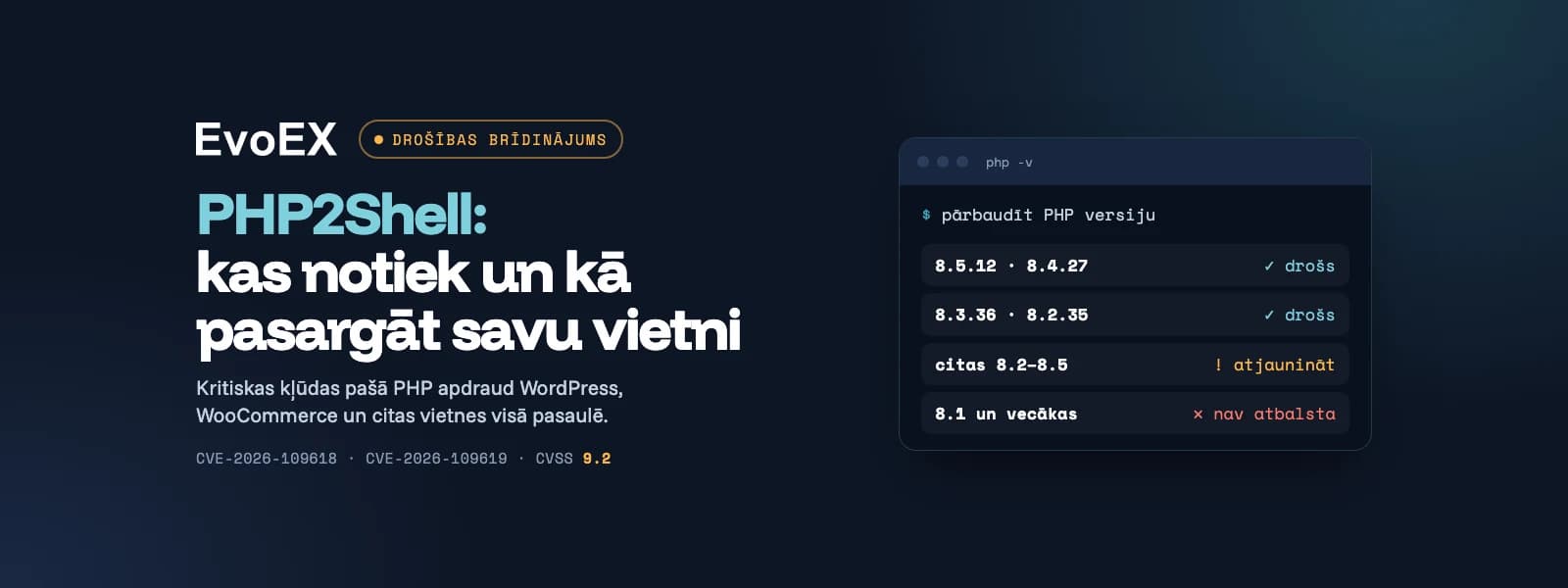
On October 21, PHP developers disclosed and patched two critical vulnerabilities in the PHP language itself, dubbed PHP2Shell (CVE-2026-109618 and CVE-2026-109619). Since WordPress, WooCommerce, and the majority of the world's websites run on PHP, this represents one of the most serious security alerts for website owners in recent years.
In this article, we explain in simple terms what has happened, which websites are at risk, and what you should do today.
What is PHP2Shell?
PHP2Shell is two vulnerabilities in the PHP engine—the software that runs your website's code on the server. PHP's security team has assigned both a severity rating of 9.2 out of 10 (CVSS 4.0).
What they allow an attacker to do:
execute their own code on your server without a password or login (known as remote code execution or RCE);
read data from server memory, similar to the infamous Heartbleed vulnerability.
In practice, this means an attacker can take control of your website, steal customer data, inject malware, or use your server for further attacks.
Why plugin updates won't help this time
Usually, WordPress security issues come from plugins or themes, and are fixed by an update in the site admin panel. This time, the vulnerability is in PHP itself, not your website's code. This means:
even a website with clean, fully updated code can be at risk;
the fix requires updating PHP on your server, which is typically handled by your hosting provider or developer.
Which websites are at risk?
According to the PHP team, every PHP installation serving web requests is affected. This applies to all major server solutions: PHP-FPM, Apache with mod_php, php-cgi, LiteSpeed, and FrankenPHP.
Platforms affected include WordPress, WooCommerce, Magento, Shopware, and virtually any other PHP website or e-commerce store.
What's happening globally
On October 21st, PHP released official patches for versions 8.5.12, 8.4.27, 8.3.36, and 8.2.35.
Security researchers have already demonstrated working attacks against Magento 2.4.9 and ten other PHP applications.
Exploit code is being shared publicly online. Some of it is unverified and may contain malware, so you should never run it.
Reports of real-world attacks are mixed so far: some security firms report initial attempts, while others haven't yet confirmed breaches. Experience shows that mass attacks typically begin very quickly after such vulnerabilities are made public, so waiting isn't wise.
How to check your website's PHP version
For WordPress sites: in the admin panel, go to Tools → Site Health → Info → Server. You'll see the PHP version listed there.
In your hosting control panel (cPanel, Plesk, DirectAdmin, etc.), the PHP version is usually shown in a section called PHP Settings or Select PHP Version.
Ask your developer or hosting provider whether PHP has been updated since October 21st.
Safe versions are 8.5.12, 8.4.27, 8.3.36, and 8.2.35 or later in the same branch.
What if your site runs PHP 8.1 or older
The PHP project no longer officially supports versions 8.1 and earlier, so regular updates won't be released for them. Patches are available for older branches, and some hosting providers and Linux distributions apply them independently, but you shouldn't rely on this.
Our recommendations:
ask your hosting provider whether the PHP2Shell patch has been installed on your server;
plan a migration to a supported PHP version (8.2 or later). It's not only more secure but also faster.
Warning signs to watch for
new admin users you didn't create;
unfamiliar files in website directories;
suddenly slow website or unusually high server load;
redirects to unfamiliar pages or strange content on your site;
warnings from Google or antivirus that your website is dangerous.
And two more simple tips: make sure you have fresh backups, and don't use "testing" tools from unknown sources. Lately, these kinds of tools are being used to spread malware.
What We Did at EvoEX
On the same day the vulnerabilities were made public:
we checked all our managed websites and servers — no signs of compromise were found;
we enabled high security settings on all our managed sites;
we strengthened monitoring and deployed additional sensors on every website to catch suspicious requests in time;
CyberEX automatically blocks attacks and temporarily takes down the page if needed to protect your data;
we prepared patches for deployment during evening hours with minimal downtime;
we notified all our clients.
A temporarily offline page is far less damaging than a compromised server or leaked customer data, so security is our top priority during this period.
Frequently Asked Questions
Is my WordPress site at risk?
If the server is running a PHP version older than 8.5.12, 8.4.27, 8.3.36, or 8.2.35, then yes, there is a risk regardless of how up-to-date your plugins are.
Is it enough to update WordPress and plugins?
No. The vulnerability is in PHP itself, so you need to update the PHP version on your server.
I'm an EvoEX client. Do I need to do anything?
No, we're taking care of your website. If we need to temporarily take your site offline for any reason, we'll notify you.
My website isn't managed by EvoEX. Can you help?
Yes. Contact us, and we'll help you check your website's PHP version and security.
Need Help with a Check?
If you're unsure whether your website is protected, get in touch with EvoEX. We'll check your PHP version, server settings, and recommend next steps.
Sources:
Tenable: PHP2Shell FAQ
Help Net Security: PHP2Shell: Critical PHP vulnerabilities patched
Sansec: PHP2Shell research
watchTowr: PHP RCE FAQ

Ready to start your project?
Tell us about your idea — we'll email you a proposed time for a video call to discuss the details and prepare a quote.